
Subject Areas
Basics
Algebra
Geometry
Statistics
Trigonometry
Calculus
Tools / Misc
GED
Graphing
Math Tools

Understanding Numbers
Fractions & Decimals
Mixed Numbers
Proportions
Order of Operations
Scientific Notation
Money
Time
Diamond Problems
Algebra Tile
Generic Rectangles
Functions
Matrices
Polynomial Functions
Exponential Functions
Sequences & Series
Conics
Lines & Angles
Slope Equations
Congruent Triangles
Concurrency & Midsegments
Quadrilaterals
Similarity
Right Triangles
Circles
Polygons
Volume
Surface Area
Combinatorics
Probability
Data Analysis
Angles, Functions & Laws
Unit Circle
Calculus Viewer Requirement
Limits
Derivatives
Integrals
GED Exam Information
Graphing Basics
Chart & Graph Interpretation
Family of Curves
Calculators
Graph Paper
Flash Cards

Number Line
Flash Cards
Flash Cards (Pos. & Neg. Numbers)
Decimal Operations
Fraction Operations
Fraction - Decimal - Percent Conversion
Improper Fractions - Mixed Numbers
Mixed Number Operations
Proportions
Measurement Conversion
Order of Operations
Pluses and Minuses
Scientific Notation
Making Change
Telling Time
Simple
Advanced
Plain Tile
Positive(+) & Negative (-) Tile
Binomial Multiplication
Factoring
Function Operations
Function Composition
Calculate Slope & Linear Equation Forms
Absolute Value Equations
Systems of Equations
Graphing Linear Equations
Graphing Linear Inequalities
Inverse Functions
Direct, Inverse & Joint Variation
Matrix Basics
Matrix Multiplication
Matrices in Motion
Complex Numbers
Solving Quadratic Equations
Synthetic Division
Remainder & Factor Theorem
Rational Roots Theorem
Descartes Rule of Signs
Partial Fraction Decomposition
Solving Radical Equations
Exponents
Compounding
Exponential Function Graphing
Solving Exponential Functions
Logarithms
Solving Logarithmic Equations
Arithmetic Sequences
Geometric Sequences
Repeating Decimals
Circles & Ellipses
Hyperbolas
Parabolas
Distance & Midpoint
Add & Bisect Segments
Complementary & Supplementary Angles
Vertical Angles
Parallel Lines & Transversals
Slope Equations
Parallel & Perpendicular Line Equations
Corresponding Parts
Incenters
Parallelograms
Trapezoids & Kites
Similar Polygons
Using Geometric Means
Special Right Triangles
Trigonometric Functions
Chord Segment Lengths
Secant Segment Lengths
Tangent & Secant Segment Lengths
Inscribed Angles
External Angles Formed by Two Secants
Internal Angles Formed by Two Chords
Sector Areas
Arc Lengths
Angle Measure
Areas
Prism Volume
Cone & Sphere Volume
Pyramid Volume
Prism Surface Area
Cone & Sphere Surface Area
Pyramid Surface Area
Permutations & Combinations
Probability & Odds
Mean, Median & Mode
Measuring Variability
Histograms
Box & Whiskers Drawings
Normal Distribution
Angle Measure
Sine, Cosine & Tangent
Law of Sines
Law of Cosines
Unit Circle
Read Me First
Continuous Function Limits
Discontinuous Function Limits
Derivatives
Product Rule
Quotient Rule
Chain Rule
Derivative Applications
Implicit Differentiation & Related Rates
Indefinite Integrals
Definite Integrals
Definite Integral Applications
Advanced Integration Techniques
About GED Exam
xy Graphing
Answer Grid
Graphing Basics
Pie Charts
Horizontal Bar Charts
Vertical Bar Charts
Line Graphs
Family of Curves
Transformations
Basic Calculator
Graphing Calculator
Graph Paper
Flash Cards


bCalc
drag-N-drop
X
gCalc
drag-N-drop
X

__

Similar Polygon Help |

|
To enlarge or reduce the size of a polygon, you must first determine the scale factor.
If you are reducing the size, the scale factor will be less than one (1). If you are enlarging the size, the scale factor will be greater than one (1). Be careful to note whether you are going from large-to-small or small-to-large. The scale factor is determined by finding 2 similar sides where the length is given. Example 1:
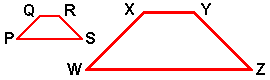
Given: PQ = 3 QR = 2 RS = 3 SP = 5
If: WZ = 10
Then: Scale Factor = WZ/SP = 2
WX = 6 XY = 4 YZ = 6
Note how each side was twice the size of the smaller polygon.
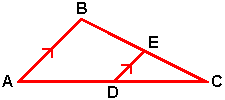
For the triangles shown below, you follow the same procedure outlined above but be careful that you account for the total length of the sides of the larger triangle, especially where they overlap.
Example 2:
Given: AB = 8 AD = 12 BE = 7.5
If: CD = 8
Then: Scale Factor = CD/(AD+CD) = 8/20 = 0.4
DE = 0.4(AB) = 0.4(8) = 3.2
EC = 0.4(BE+EC) = 0.4(7.5+EC) = 3+0.4(EC)
0.6(EC) = 3
EC = 3/0.6 = 5
Note how each side was four tenths the size of the larger triangle.
|


© 2002- John Schlecht. All rights reserved.